In this post, we will provide guidance on where to start reviewing accessibility issues, how to use SiteImprove to prioritize remediation, how to resolve any accessibility issues flagged by SiteImprove, and where the content editor is responsible for resolving certain types of issues.
Title II of the Americans with Disabilities Act requires state and local governments to make sure that their services, programs and activities are accessible to people with disabilities.
State and local governments must make sure that their web content meets WCAG 2.1, Level AA,
CMS website owners are responsible for the content on their websites meeting the WCAG 2.1, Level AA guidelines.
Anything not fully accessible should be made as accessible as possible, and time, cost, or knowledge constraints are not legitimate reasons to not do so.
Where to start: review accessibility issues
UMass Chan uses Siteimprove to track analytics for quality assurance, SEO and Accessiblity.
Please review the following links if you are unfamliiar with Siteimprove analytics or ADA and WCAG compliance:
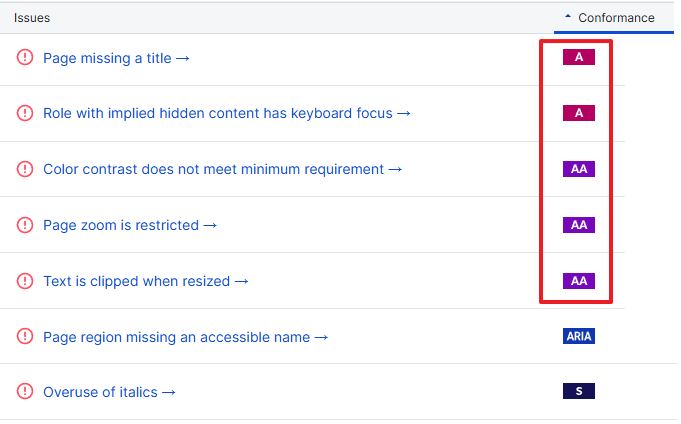
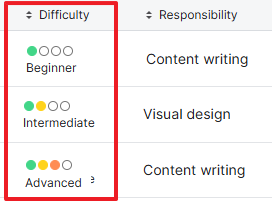
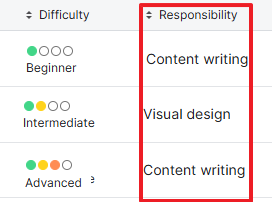
Within Siteimprove's report, you will see column headings for Conformance, Difficulty, Responsibility, etc. We will review and explain these items below. Sorting on the table headings will help prioritize issues
Conformance
Our webpages need to be complaint for "A" and "AA". You can filter out "S" (best practices) and "Aria" for now. While "S" and "Aria" should be resolved, they do not need to be resolved for the April 24, 2026 deadline.
Difficulty
You can use this "Difficulty" column to prioritize the pages you need to resolve. For example, click the "difficulty" heading to change the sort order showing all "Beginner" items first.
Responsibility
Siteimprove has tagged issues as "visual design," "content writing," "ux design," or "development." While reviewing issues on your pages, most tagged as "development" you can ignore; however there are a few that the content editor must resolve. In the Resolving issues section below, we identify the responsibility for each issue.
As new issues appear or if there is confusion on how to resolve an issue, we will use the CMS Yammer channel to post solutions as well as update this blog post.
If you are unsure if the issue listed is your responsibility, submit a ticket to IT and we can review how best to resolve.
Occurences and Pages columns
Alerts you to how many times this issue is noted within your site and how many pages need resolution. You may want to prioritize the pages that receive the most traffic.
Resolving issues
Conformance
Difficulty
Description
Headings should clearly describe the content they introduce. Siteimprove uses AI to review whether headings are descriptive. You can edit the review at any time if needed.
Responsibility
Content editor
Steps to resolve
This can be a tough one to resolve. The best way to think about a descriptive header, if this heading was taken out of context, what would it mean to the viewer? Or being blind and only hearing the header, is it informative enough to know what content will follow? As an added benefit, the more descriptive headers also help with SEO rankings and better search results within our own site searches.
Some examples of how to make a header more descrtive:
"Our Services" Sighted viewers can easily identify what site they are on or quickly gather contextual clues around the page that "Our" may be referring to. Someone blind, or visually impaired may not see/hear those other clues, so out of context, what does "Our" refer to?
Instead of "Our Services," a suggestion might be "Services for Sibling Support" or "Service provided by the CANs program."
"FAQs" A more descriptive header might be "Course help: Frequently asked questions" or "FAQs regarding the MST program."
If you have updated a headline to what you believe to be truly as descriptive as it can be, you can mark this issue by marking the issue as reviewed.
In Siteimprove, when reviewing your page, along the left you will see "Note that this occurrence is based on a guided review."
Click on the pencil icon and the area changes to display the question "Does this heading clearly describe the content it introduces?"
click the yes button if you truly believe this is the most descritive this heading will be
Conformance
Difficulty
Description
Buttons should always have a text label. The label can be inserted into the HTML — it does not need to be visible to pass this check. Buttons represented by images or icons may be unusable to visitors using assistive technology, provide the image's ALT description.
Responsibility
Mixed
Steps to Resolve
Many of these are due to empty button elemnts in the WYSIWYG. These may have been accidentally copied from another source.
Empty button tags in the WYSIWYG: Content editor
In Siteimprove, the space highlighted appears empty
Edit the content in the WYSIWYG
Delete any extra blank spaces following the text where Siteimrpove highlighted the empty space
Pagination on listing blocks: Developer
IT has fixed this issue and will rerun the Siteimrpove scan to ensure this issue has been resolved.
In siteimprove, any items resembling pagination, EX:
Conformance
Difficulty
Description
There is insufficient color contrast between the text and background on this page to meet the minimum contrast requirement. Text and background colors that conflict or have too little contrast between each other can cause readability issues for users who are color blind or have low vision (vision loss equivalent to approx. 20/40 vision).
Responsibility
Mixed
Steps for resolution
Colored text within the WYSIWYG: Content editor
There are 3 possible options to resolve this issue, and in some cases, it may be a combination of options:
Update the text color to a darker color using the WYSIWYG text color picker
STEPS
In the WYSIWYG, select the text with the color issue
Apply a color from the color picker note: before picking orange or red, IT Chan must first update the color swatches so orange and red are the correct ratios
Do this for each piece of text that needs to be updated
publish the content
For those that have a red text not meeting accessibility, highlight the text and choose red from the text color picker. The text may have been copied/pasted from another source (like MS Word). The red in the text color picker will meet accessiblity requirements.
Update the text size
STEPS
Select the text in the WYSIWYG
Click on the Format menu and then font sizes, choose a larger size
Do this for each piece of text that needs to be updated
publish the content
Make the text bold
STEPS
Select the text in the WYSIWYG
Click the bold icon on the menu
Do this for each piece of text that needs to be updated
publish the content
Orange buttons within the WYSIWYG: Developer
IT has updated the style sheets to show black text on the orange background to ensure the contrast meets accessibility guidelines.
Note: IT will rerun the Siteimprove scan to see which issues have been resolved. It any remain, editors will need to adjust the text size if text is too small or update the text color to black.
- RESOLVED -
Calendar month view "TODAY": Developer
IT has fixed this issue and will rerun the Siteimprove scan to ensure this issue have been resolved.
- RESOLVED -
RSS block pagination: Developer
IT has fixed this issue and will rerun the Siteimprove scan to ensure this issue have been resolved.
Conformance
Difficulty
Description
This page contains one or more "empty" headings (heading tags with no text content).
Responsibility
Content Editor
Steps to resolve
IT has implmented a fix where there was an issue due to the way the template was created. We will run a new Siteimprove scan to see how many noted issues this resolves.
Any remaining issues, content editors will need to fix within their content.
Empty H1 heading at top of page: Content editor
For the Content editor, upon completion of the previous step, we will update the instructions on this content and alert editors via the CMS Yammer channel.
If Siteimrpove still flags your page with the issue of missing the top H1 heading tag, add text to the Headline property of your page. EX:
Empty heading tag elsewhere in content: Content editor
Blocks or other areas of the page missing text in headings. Here, someone wanted space above an H2. In the WYSIWYG it is easy to accidentally create empty headings. EX:
Delete the blank space(s), this will delete the empty heading.
If you want additional space above or below a heading, hold down the SHIFT key and then use the ENTER button to create a single line return within the same HTML tag, thus no empty tags.
Note: some of these issues may be hard to resolve in the WYSIWYG and may need IT guidance.
Conformance
Difficulty
Description
Every form element should have a descriptive text label. Unclear labels make form-filling harder for everyone. A label may already be visible on the page — but to be accessible, that label needs to be associated with the form element in the HTML.
Responsibility
Content editor
Steps to resolve
Note: Some of these may require IT's help in understanding the steps to fix
Some forms are included in webpages using an iframe
EX:
Mailchimp forms - if you have embedded a Mailchimp form and it was flagged as missing a label - you will need to update that form in Mailchimp
CMS forms: Content editor
These are forms created using the CMS forms functionality.
Editing your CMS form
edit the form element(s) that Siteimprove has highlighted
add text to the Label Text property
- RESOLVED -
Profiles Faculty Listing block dropdown down filters: Developer
IT has fixed this issue and will rerun the Siteimrpove scan to ensure this issue has been resolved.
Pagination on listing blocks: Developer
IT has fixed this issue and will rerun the Siteimrpove scan to ensure this issue has been resolved.
- RESOLVED -
Dropdown blocks: Developer
IT has fixed this issue and will rerun the Siteimrpove scan to ensure this issue has been resolved.
Custom menu blocks: Developer
IT has fixed this issue and will rerun the Siteimrpove scan to ensure this issue has been resolved.
Conformance
Difficulty
Description
All non-decorative images must have a text alternative (also known as "alt text"). The text alternative should describe the image within the context of the page — letting visitors know what the image means and why it was included.
Responsibility
Content editor
All images should have their "Alt - Alternative Text" property populated.
Steps for resolution
There 2 ways to update the image ALT description depending on where it is located in the CMS.
Image residing in the WYSIWYG editor: Content Editor
If the image is located in the WYSIWYG editor
click on the image to select it
a button will popup "Go to Media" above or below the image
click on the "Go to Media" button
the image opens up for editing
make sure you are in properties view
on the content tab, add text to the "Alt - Alternative Text" property
publish the image
Image set in the image property of a page or block: Content Editor
If the image set as an image property of a page or block
click on the image in the property field
a window pops up, scroll to the selected image (alternatively, find the image in the media assets pane)
hover over the image and click on the "..." and click on edit
the image opens up for editing
make sure you are in properties view
on the content tab, add text to the "Alt - Alternative Text" property
Publish the image
Conformance
Difficulty
Description
Every inline frame (iframe) should have a text alternative that summarizes its content or purpose. Inline frames (iframes) are used to insert content from other parts of the web.
Responsibility
Content Editor
Steps to resolve
A title attribute must be added to the iFrame that has been placed in the WYSIWYG editor or within an HTML block. Click on one of the buttons below to view video instructions depending on where your iframe is implemented:
Links should always have a text alternative. The link text can be inserted into the HTML — it does not need to be visible to pass this check. Links represented by images or icons can be problematic for visitors who are blind or have low vision.
The text alternative should describe the link's purpose — or what visitors can expect to find after they click it.
Responsibility
Content editor
Steps to resolve
If a link is on an image, there are 2 things to review: Content editor
ensure the image has an ALT description
click on the image to select it
click on the Image icon on the WYSIWYG menu
a window will pop up, add text to the Alternative description field
click save
publish your content
add a title to the link, typically this will only be on an image
select the image in the WYSIWYG
Click on the link icon on the menu
Provide a link title
click save
publish the content
Empty links in the WYSIWYG editor: Content editor
Many of these are empty links that were accidentally created in the WYSIWYG (link tags that were orphaned and contain no text). Sometimes adding a space or paragraph right after a link can create an empty link tag.
When editing the content, empty link tags are hard to spot
First confirm if this is the issue (in Siteimrpove), EX:
From Siteimprove, this example shows a highlight on an empty space
If it's an empty space, edit the content
when editing in the WYSIWYG, there may be no sign of this extra link, all seems to look ok
Place your cursor at the end of the link (highlighted in yellow) and select the empty space after the link title. You will see there is indeed space after the link title
Delete the space. Check content for other empty spaces and remove them as needed.
Publish the content
Conformance
Difficulty
Description
Color alone is not enough to distinguish a link from the surrounding text. People who are colorblind may be unable to find a link if color is its only distinguishing feature. Providing another visual cue —such as underlining or bolding the link text— will also make it easier for non-colorblind people (especially people with low vision) to scan the page.
Responsibility
Developer
Steps to resolve
IT has fixed this issue and will rerun the Siteimrpove scan to ensure this issue has been resolved.
Page missing a title
Conformance
Difficulty
Description
Every page needs a descriptive title. The title is the first thing announced by a screen reader after a page loads. This lets the user know where they are on your site and what type of content to expect. The browser title is what displays on the browser tab.
Responsibility
Content editor
Steps to resolve
This indicates that the Browser Title property on the page is missing: Content editor
Edit the page and in All Properties view, select the Metadata tab and fill in the Browser Title field
Conformance
Difficulty
Description
A table header cell should have the role of columnheader or rowheader as this describes its relationship to other cells in the table. When a screen reader user navigates a table, each data cell is announced along with the relevant column or row header.